91 lines
7.0 KiB
Markdown
91 lines
7.0 KiB
Markdown

|
# Screenity
|
|||
|
|
[](https://screenity.io)
|
|||
|
|
|
|||
|
|
|
|||
|
|
The free and privacy-friendly screen recorder with no limits 🎥
|
|||
|
|
|
|||
|
|
[Get it now - it's free!](https://chrome.google.com/webstore/detail/screenity-screen-recorder/kbbdabhdfibnancpjfhlkhafgdilcnji)
|
|||
|
|
|
|||
|
|
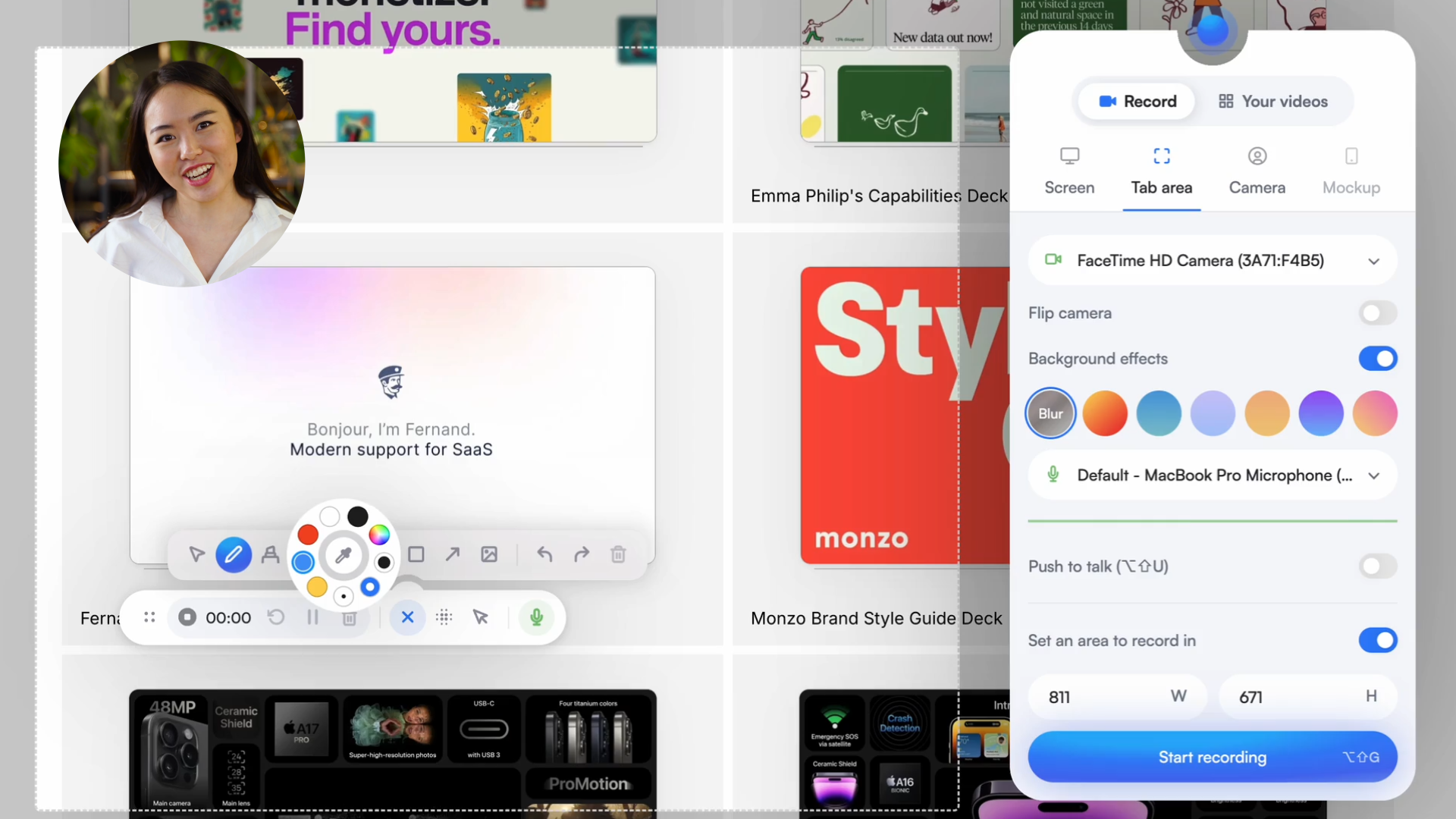
Screenity is a powerful privacy-friendly screen recorder and annotation tool to make better videos for work, education, and more. You can create stunning product demos, tutorials, presentations, or share feedback with your team - all for free.
|
|||
|
|
|
|||
|
|
> You can support this project (and many others) through [GitHub Sponsors](https://github.com/sponsors/alyssaxuu)! ❤️
|
|||
|
|
|
|||
|
|
Made by [Alyssa X](https://alyssax.com)
|
|||
|
|
|
|||
|
|
<a href="https://www.producthunt.com/posts/screenity?utm_source=badge-top-post-badge&utm_medium=badge&utm_souce=badge-screenity" target="_blank"><img src="https://api.producthunt.com/widgets/embed-image/v1/top-post-badge.svg?post_id=275308&theme=light&period=daily" alt="Screenity - The most powerful screen recorder for Chrome | Product Hunt" style="width: 250px; height: 54px;" width="250" height="54" /></a>
|
|||
|
|
<a href="https://news.ycombinator.com/item?id=25150804" target="_blank"><img height=53 src="https://hackerbadge.now.sh/api?id=25150804&type=orange" alt="Featured on HackerNews"></a>
|
|||
|
|
|
|||
|
|
> ❗️ Screenity has been rebuilt from the ground up, and updated to MV3. [Click here](https://help.screenity.io/getting-started/77KizPC8MHVGfpKpqdux9D/what%E2%80%99s-changed-in-the-new-version-of-screenity/bDtvcwAtw9PPesQeNH4zjE) to here to learn more about why, and what's changed in the new version. Also note that **the license has changed to [GPLv3](https://github.com/alyssaxuu/screenity/blob/master/LICENSE)**, but the older MV2 version remains MIT licensed. Make sure you read the license and the [Terms of Service](https://screenity.io/en/terms/) regarding intellectual property.
|
|||
|
|
|
|||
|
|
## Table of contents
|
|||
|
|
|
|||
|
|
- [Features](#features)
|
|||
|
|
- [Self-hosting Screenity](#self-hosting-screenity)
|
|||
|
|
- [Creating a development version](#creating-a-development-version)
|
|||
|
|
- [Enabling Save to Google Drive](#enabling-save-to-google-drive)
|
|||
|
|
- [Acknowledgements](#acknowledgements)
|
|||
|
|
|
|||
|
|
## Features
|
|||
|
|
|
|||
|
|
🎥 Make unlimited recordings of your tab, a specific area, desktop, any application, or camera<br>
|
|||
|
|
🎙️ Record your microphone or internal audio, and use features like push to talk<br>
|
|||
|
|
✏️ Annotate by drawing anywhere on the screen, adding text, arrows, shapes, and more<br>
|
|||
|
|
✨ Use AI-powered camera backgrounds or blur to enhance your recordings<br>
|
|||
|
|
🔎 Zoom in smoothly in your recordings to focus on specific areas<br>
|
|||
|
|
🪄 Blur out any sensitive content of any page to keep it private<br>
|
|||
|
|
✂️ Remove or add audio, cut, trim, or crop your recordings with a comprehensive editor<br>
|
|||
|
|
👀 Highlight your clicks and cursor, and go in spotlight mode<br>
|
|||
|
|
⏱️ Set up alarms to automatically stop your recording<br>
|
|||
|
|
💾 Export as mp4, gif, and webm, or save the video directly to Google Drive to share a link<br>
|
|||
|
|
⚙️ Set a countdown, hide parts of the UI, or move it anywhere<br>
|
|||
|
|
🔒 Only you can see your videos, we don’t collect any of your data. You can even go offline!<br>
|
|||
|
|
💙 No limits, make as many videos as you want, for as long as you want<br> …and much more - all for free & no sign in needed!
|
|||
|
|
|
|||
|
|
## Self-hosting Screenity
|
|||
|
|
|
|||
|
|
You can run Screenity locally without having to install it from the Chrome Store. Here's how:
|
|||
|
|
|
|||
|
|
1. Download the latest Build.zip from the [releases page](https://github.com/alyssaxuu/screenity/releases)
|
|||
|
|
2. Load the extension by pasting `chrome://extensions/` in the address bar, and [enabling developer mode](https://developer.chrome.com/docs/extensions/mv2/faq/#:~:text=You%20can%20start%20by%20turning,a%20packaged%20extension%2C%20and%20more.).
|
|||
|
|
3. Drag the folder that contains the code (make sure it's a folder and not a ZIP file, so unzip first), or click on the "Load unpacked" button and locate the folder.
|
|||
|
|
4. That's it, you should now be able to use Screenity locally. [Follow these instructions](#enabling-save-to-google-drive) to set up the Google Drive integration.
|
|||
|
|
|
|||
|
|
## Creating a development version
|
|||
|
|
|
|||
|
|
> ❗️ Note that the license has changed to [GPLv3](https://github.com/alyssaxuu/screenity/blob/master/LICENSE) for the current MV3 version (Screenity version 3.0.0 and higher). Make sure to read the license and the [Terms of Service](https://screenity.io/en/terms/) regarding intellectual property.
|
|||
|
|
|
|||
|
|
1. Check if your [Node.js](https://nodejs.org/) version is >= **14**.
|
|||
|
|
2. Clone this repository.
|
|||
|
|
3. Run `npm install` to install the dependencies.
|
|||
|
|
4. Run `npm start`.
|
|||
|
|
5. Load the extension by going to `chrome://extensions/` , and [enabling developer mode](https://developer.chrome.com/docs/extensions/mv2/faq/#:~:text=You%20can%20start%20by%20turning,a%20packaged%20extension%2C%20and%20more.).
|
|||
|
|
6. Click on `Load unpacked extension`.
|
|||
|
|
7. Select the `build` folder.
|
|||
|
|
|
|||
|
|
### Enabling Save to Google Drive
|
|||
|
|
|
|||
|
|
To enable the Google Drive Upload (authorization consent screen) you must change the client_id in the manifest.json file with your linked extension key.
|
|||
|
|
|
|||
|
|
You can create it accessing [Google Cloud Console](https://console.cloud.google.com/apis/credentials) and selecting Create Credential > OAuth Client ID > Chrome App. To create a persistent extension key, you can follow the steps detailed [here](https://developer.chrome.com/docs/extensions/reference/manifest/key).
|
|||
|
|
|
|||
|
|
## Libraries used
|
|||
|
|
|
|||
|
|
- [FFmpeg WASM](https://ffmpegwasm.netlify.app/) for editing and encoding videos
|
|||
|
|
- [Tensorflow](https://github.com/tensorflow/tfjs) with the [Selfie Segmentation](https://blog.tensorflow.org/2022/01/body-segmentation.html) model
|
|||
|
|
- [Fabric.js](https://github.com/fabricjs/fabric.js) for drawing and annotating
|
|||
|
|
- [Radix Primitives](https://www.radix-ui.com/primitives) for the UI components
|
|||
|
|
- [react-color](https://uiwjs.github.io/react-color/) for the color wheel
|
|||
|
|
- [localForage](https://github.com/localForage/localForage) to help store videos offline with IndexedDB
|
|||
|
|
- [Wavesurfer.js](https://wavesurfer.xyz/) to create audio waveforms in the popup and the editor
|
|||
|
|
- [React Advanced Cropper](https://advanced-cropper.github.io/react-advanced-cropper/) for the cropping UI in the editor
|
|||
|
|
- [fix-webm-duration](https://github.com/yusitnikov/fix-webm-duration) to add missing metadata to WEBM files
|
|||
|
|
|
|||
|
|
## Acknowledgements
|
|||
|
|
|
|||
|
|
- Thanks to [HelpKit](https://www.helpkit.so/) for sponsoring this project by hosting the [Screenity Help Center](https://help.screenity.io/).
|
|||
|
|
- Thanks to [Mei Xuan](https://www.behance.net/meixuanloo) for helping with the Chinese translation of the extension.
|
|||
|
|
|
|||
|
|
If you need any help, or want to become a Screenity expert, you can browse articles and guides in the [help center](https://help.screenity.io). You can also submit any feedback or ideas in this [form](https://tally.so/r/3ElpXq), or contact through [this page](https://help.screenity.io/contact)
|
|||
|
|
|
|||
|
|
Feel free to reach out to me through email at hi@alyssax.com or [on Twitter](https://twitter.com/alyssaxuu) if you have any questions or feedback! Hope you find this useful 💜
|